Every other week, you will have an assignment to write a post outlining and focusing on what you learned this week, related to this class. Be open to including all kinds of learning in your posts.
Continue reading “Welcome To The Learning Journal”Flexbox and Grid
This week, I learned more about using Flexbox and Grid to create layouts with CSS. At first, there were many different properties to remember, and some of them were confusing. After practicing them in different layouts, I started to understand how they work together and how each property can change the position and spacing of elements.
Continue reading “Flexbox and Grid”SVG, Icons, Img & Interlinks
In the most recent lesson, we explored the usage of the Icons for the typical link-tree footers using Font Awesome and an <i> tag. After viewing the W3C Schools description for the <i> tags, it is defined for an alternate voice or mood.
Continue reading “SVG, Icons, Img & Interlinks”Weeks 3 – 4: Diving Deeper into HTML & CSS
The past two weeks have been incredibly informative. There was so much that I learned and I’m hoping it all the information absorbs into me.
Continue reading “Weeks 3 – 4: Diving Deeper into HTML & CSS”What I Learned This Week
Continuing with HTML and Starting CSS and Fonts
Over the past two weeks, I have learned more about HTML, CSS, typography, and web design. One of my favorite topics was typography because I learned how different fonts, sizes, spacing, and styles can change the overall look of a webpage.
I learned how to create a typographic hierarchy by using CSS properties such as font-family, font-weight, and line-height. I also learned about kerning and line spacing and how these small details can make text easier to read and improve the overall design.
Continue reading “What I Learned This Week”Week 3-4
This week, I studied font handling and how to properly implement them in CSS. I learned how to establish a typographic hierarchy on a page using properties such as font-family, font-weight, font-size, and line-height. I also explored CSS selectors and how to use them effectively to target specific elements. I mastered basic tag, class, and ID selectors and learned to combine them to create complex styling structures. Additionally, I gained an understanding of pseudo-classes and pseudo-elements for managing interactivity (such as :hover) and styling specific elements. Applying these skills enables me to create layouts that are cleaner, more structured, and visually appealing.
What I Learned About HTML, CSS, and Web Fonts
Over the past two weeks, I learned a lot about how websites are built and styled. I practiced semantic HTML, CSS selectors, web fonts, and started learning how to put my work online. Some parts were challenging at first, but seeing everything work in the browser made it much easier to understand.
One of the biggest things I learned was how HTML and CSS work together. HTML gives a page its structure, while CSS controls how it looks. Practicing CSS selectors helped me understand how I can target specific elements without changing everything on the page.
I also enjoyed learning about typography. I learned that there are different ways to add fonts to a website. I practiced using Google Fonts as well as locally hosted fonts with @font-face. I also worked with variable fonts, which was new to me. I liked seeing how changing the font can completely change the feeling of a webpage.
Another important step was learning how website files are organized. I had to pay attention to folders, file names, images, font files, and paths in my HTML and CSS. A small mistake in a path can prevent an image or font from appearing, so I am becoming more careful about how I organize my projects.
I feel more comfortable working with HTML and CSS than I did two weeks ago. There is still a lot for me to learn, especially when it comes to publishing websites and working with servers, but I am starting to understand how all the different pieces fit together.
Learning More About CSS and Typography
Over the past couple of weeks, I learned more about how CSS can change the look and feel of a webpage, especially through selectors and typography.
Continue reading “Learning More About CSS and Typography”Week 4 Learnings
This week taught me a lot about the importance of Typography in a website!
Continue reading “Week 4 Learnings”Organization with HTML and CSS
Organization can feel like a chore; practically everything in your house needs organizing: your room, your clothes, your kitchen, even your garage. Oftentimes, it can feel like a pain to have to go through everything and clean it up, but once it is done, it makes tasks that come after it feel less heavy. This also applies to HTML
Continue reading “Organization with HTML and CSS”Week 1-2: What the new things I learned
I thought I knew all the basic HTML tags until I stumbled upon native elements that handle features I used to write JavaScript for. Here are a few pleasant surprises from my recent learning process!
Read more: Week 1-2: What the new things I learnedBefore diving deeper into HTML documentation, I was confident that I already knew all the essential tags. However, I recently discovered a few powerful native elements that I previously assumed required complex JavaScript code. For example, I had no idea that <progress> provides a built-in tag for progress bars without needing JS logic to render the basic UI, or that <datalist> offers a native way to create autocomplete dropdown lists for input fields. I am still in the process of exploring HTML tags on W3Schools , but I highly recommend this resource for anyone studying web development independently.
Weeks 1 – 2: Relearning the Fundamentals
Jumping back into school after taking a 5 year break from learning anything new I reacclimatized myself quickly to the online platform. Although I have a some experience with HTML from my 9 to 5 I feel like relearning the basics and its helping me to deeper my understanding of the markup language I use on a daily basis.
Continue reading “Weeks 1 – 2: Relearning the Fundamentals”What I Learned in My First Two Weeks
During the first two weeks of this class, I learned more about how HTML works and how it is used to build webpages. Before this class, I knew a little about websites, but I did not really understand what was happening behind the page.
Continue reading “What I Learned in My First Two Weeks”Trusting the process with HTML
I’ve always been the type to want to know the ending before anything else; I’ve been that way for books, movies, shows—anything, really. It wasn’t until this last week that I realized I do the same thing with HTML.
Continue reading “Trusting the process with HTML”Learning More About HTML
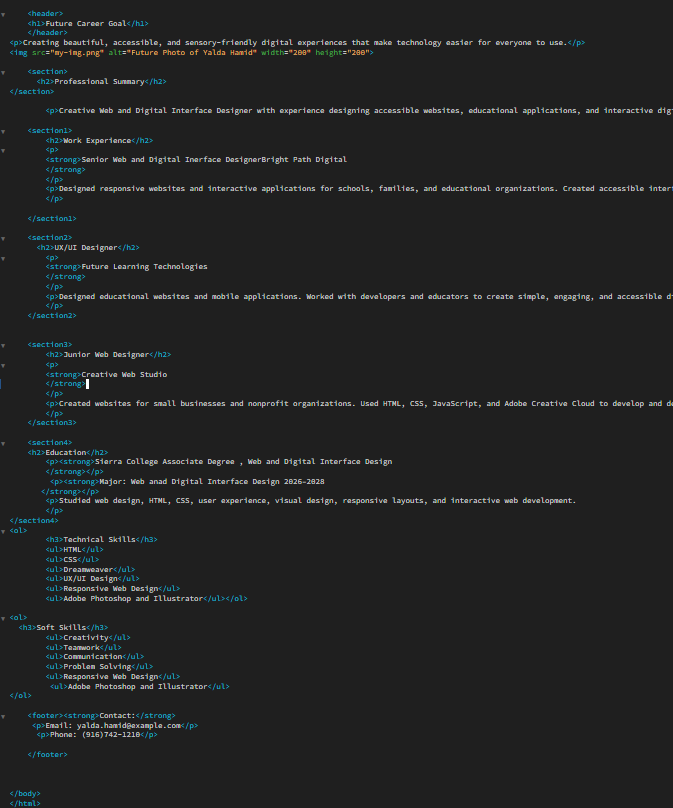
This week I feel like HTML started to make a little more sense to me. At first, I was mostly focused on remembering different tags and trying not to make mistakes in my code. But after working on my future resume and looking through other students’ code, I started paying more attention to how everything is organized. I learned more about <section> and <article>, and I actually went back and added <article> tags to my resume to organize each job and education entry better.
Learnings of the Week
I learned quite a fair bit this week! Both in CSS and in General. I found out while looking through the HTML Reference on MDN is that HTML elements are organized into different “content categories.”, which I was unaware of until now.
Continue reading “Learnings of the Week”My Web Design Learning Journal
Weeks 1–2: Getting Started with HTML
During the first two weeks of class, I learned how to navigate the course modules and became more familiar with the class organization, expectations, and assignments. Understanding how the course is structured has helped me know what I need to complete and what is expected of me throughout the class. At the same time, I started learning the basics of HTML and became more familiar with different HTML elements. I learned about the basic structure of an HTML document and how HTML tags are used to organize different types of content on a webpage. I practiced working with headings, paragraphs, links, images, and lists.
Read more: My Web Design Learning JournalI also learned that HTML elements can include attributes that provide additional information or affect how an element works. This helped me understand that there are many different ways to organize and build content on a webpage.
Another activity I worked on was exploring the MDN Web Docs. I looked through the documentation and discovered many HTML elements and features that I had not used before. I realized that HTML has many more tags and possibilities than I originally thought, and that each element has a specific purpose. I am still learning when and how to use different tags, but exploring them has made me more interested in web design.
Overall, these first two weeks have given me a strong beginning in learning HTML and web design. I am still getting comfortable with the different elements and how they work together, but continued practice with images, links, and webpage content is helping me build my skills. I am looking forward to learning more about HTML, CSS, and other areas of web design as the class continues.
Interactive Activities!
The past two weeks seemed to have minimal HTML layout content spillover as it was mainly concerned with CSS, specifically Sass, Bootstrap, Parallax, and even animations. Here are my thoughts!
Continue reading “Interactive Activities!”Yay Animations!
This week we got to dive into CSS animations, keyframing, and parallax! Half fun, half confusing. 🙂
Continue reading “Yay Animations!”Learning Sass, Bootstrap, and Parallax!
The past two weeks we’ve learned about a lot of different tools and techniques and they have been very interesting.
Continue reading “Learning Sass, Bootstrap, and Parallax!”I’m Feeling a Bit SASSy…
Ok ok, I guess SASS isn’t that bad…but I think I’ll stick with normal CSS, thank you very much!
Continue reading “I’m Feeling a Bit SASSy…”